Networking basics: IP, DNS, ports and packets
The networking ideas that work together every time you load a page: IP addresses, DNS, packets, ports, TCP, UDP and more.
Key takeaways
An IP address is a device's network address; DNS turns names into IP addresses.
Data travels as packets that routers pass along and the destination rebuilds.
Ports direct arriving data to the right application or service on a device.
TCP focuses on reliability and order; UDP focuses on speed.
Ever wonder what actually happens when you open a website, send a message or stream a video? Behind the scenes, several networking concepts work together in milliseconds. Here they are, grouped by the job they do.
Finding the destination
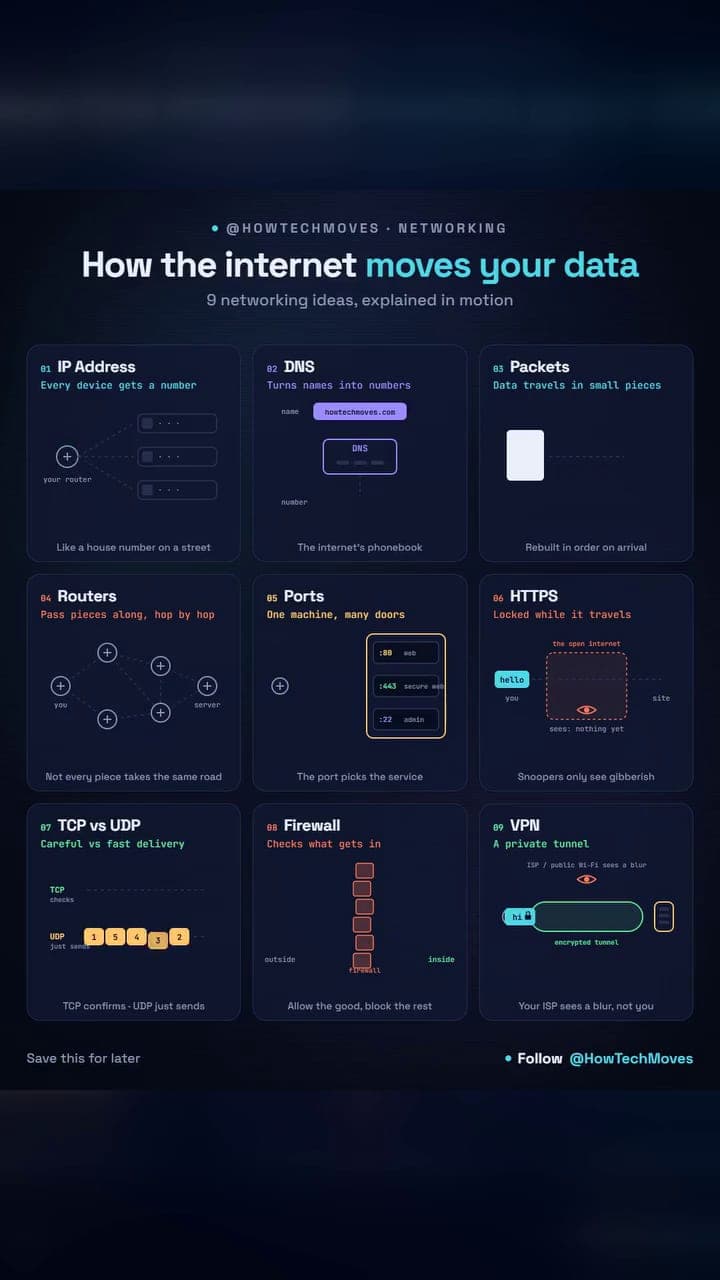
- IP address: your device's address on a network. It tells the internet where data needs to go, like a house number on a street.
- DNS: turns website names like google.com into IP addresses that computers can understand. It is the internet's phonebook.
Getting the data there
- Packets: your data is broken into small pieces called packets. They travel across the network and are rebuilt at the destination.
- Routers: guide packets from one network to another, choosing where they should travel next. Not every piece takes the same road.
- Ports: once data reaches the correct device, ports help direct it to the correct application or service. One machine, many doors: plain web traffic usually uses port 80, and secure web traffic port 443.
- TCP: focuses on reliability. It checks that packets arrive correctly and in the right order.
- UDP: focuses on speed. It sends data without waiting for every packet to be confirmed, which makes it useful for gaming, calls and streaming.
Keeping it safe
- HTTPS: encrypts communication between your browser and a website, helping keep your data secure while it travels. Snoopers only see gibberish.
- Firewall: filters network traffic and decides what is allowed in or out based on security rules. Allow the good, block the rest.
- VPN: creates an encrypted tunnel between your device and a VPN server, helping protect your internet traffic.
Why it matters
All of this can happen before a webpage even finishes loading. The internet may look simple on the surface, but underneath it is constantly moving, routing, checking, encrypting and rebuilding data. Knowing these pieces makes the rest of networking easier to learn, and it makes everyday problems less mysterious: a site that will not load might come down to DNS, a blocked port or a firewall rule rather than a broken internet.